Short URLs: Helpful Terms
Skip to:
Cloaking/Masking
DNS
Dynamic IP
Path Forwarding
URL Foward/Redirection
Just so that you don’t get confused or just stay less confused, here are a few terms that you should know before reading on.
Cloaking/masking: As in a domain, URL or subdomain.
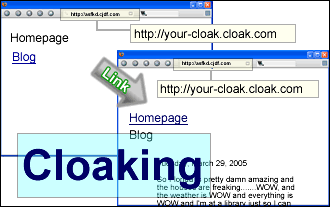
Essentially a cloak/mask allows someone to type you.shortened-url.com into the URL bar in your web browser to get to your site, which would be at you.some-other-website.com . So as long as a person stays on your site, your site will continue to be cloaked by the shortened URL. So no matter which page, or website, a visitor is at, the URL bar will always show it as you.shortened-url.com . There are some problems with this since if someone tries to bookmark a page they’ll always end up on your homepage. Also if a visitor follows a link to another website from your website, when they’re visiting your website through a cloak, the cloak will stay with them.
To correctly link to another website to free your visitor from the cloak, simply add target=”_top” to all your link commands in HTML.
Examples:
DNS: Domain Name System
DNS allows you to pretty much use a free sub-domain/domain exactly like you would with a real full-fledged domain. However, you must either have a web-server, or a web-hosting account that is capable of using it.
Dynamic IP:
This is something that you would use if you hosted your website from a computer in your house, with a high-speed internet connection. When a free subdomain/domain supports this you can host your site on the computer in your house and access it from the sub-domain/domain, exactly the same way as you would with any other website.
Path forwarding:
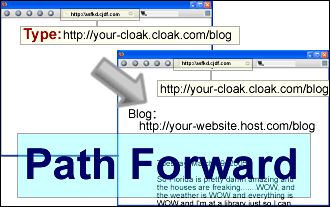
This is a newer feature that many websites that offer cloaks/masks, which essentially is an upgraded cloak, making a short URL act a little more like a real domain with real DNS. Pretty much with path forwarding you can type in you.shortened-url.com/photos.html, and then the cloak will bring up you.some-other-website-that-hosts-your-website.com/photos.html, and the location bar will say that it’s located at you.shortened-url.com/photos.html . Pretty nifty eh? The only bad part is that your website is still stuck in a cloak. So if someone visits your site though you.shortened-url.com/photos.html, then if they click a link, to go to say, your homepage, the URL bar will still show the location as you.shortened-url.com/photos.html.
Examples:
URL forward/redirection:
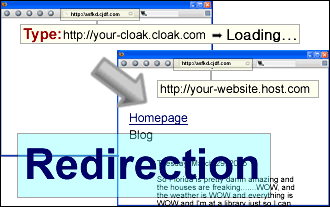
Similar to a cloak/mask, a URL forward/redirection will send a visitor to your website when they type in you.shortened-url.com into the URL/location bar thing. Only with a URL forward/redirection the location bar will show the URL as you.some-other-website-that-hosts-your-website.com instead of you.shortened-url.com .
Example: