Build a Website using WordPress
Welcome to Build-a-Website.net, a beginner’s guide to building a website. The easiest way to build your first website is to use WordPress. This article will go over the basics of starting your first website and link to additional articles that expand on some of the topics.
Why should I used WordPress to build my website?
WordPress is a flexible easy to use content management system (CMS). There are many advantages to using WordPress over other systems or hand coding your website from scratch.
Advantages of WordPress
- No coding required: You can install WordPress with the click of a button on most web hosting services. After that, you can start writing articles or setting up your website without having to know a single command of HTML, CSS, PHP, or Javascript. While coding is not necessary, learning to code will enable you to create a site that is exactly how you envisioned.
- Easy to use interface: WordPress doesn’t require very much explanation to get started.
- Extensive themes (Layouts): Themes are layouts for your WordPress. They control what your website looks like with header images, colors, and layout of your content. There are thousands of free themes. If you require more advanced features or a more unique look, there are paid themes that you can purchase and customization of an existing theme usually isn’t very expensive.
- Extensive plugins to increase functionality: Plug-ins give WordPress new features. There are plugins that add forums, eCommerce, block spam, and manage advertisements.
- Completely customizable: You can make your own themes and plugins to do almost anything possible. If there isn’t an existing theme or plugin that meet your needs you can commission a programmer to create one that will work for your purpose.
- Open-source: The code to WordPress is completely open, and you are free to read how it works and modify it if needed–note, I would not recommend that you modify core WordPress code, but you can if you’d like.
Disadvantages of WordPress
- Frequently attacked by spammers and hackers, because so many websites use WordPress.
- While WordPress is versatile, it may not be the most efficient system to run certain kinds of websites.
What kind of websites can I make on WordPress?
Although WordPress, was originally designed for blog style websites, over the last decade it has become the leading platform to start most general information type websites such as Company information sites, small ecommerce websites (with the help of plugins like WooCommerce), blogs, web-magazines, informational websites and more.
How do I buy a domain name?
You can buy a domain name from many companies such as Google, Namecheap, and GoDady. Here’s a sponsored app from Bluehost to search and buy domains from them.
Many domain names are already registered, so be creative and maybe venture away from the standard .com to get the right domain name for your website. Most of the time people will get to your site from search engines, bookmarks or other website so don’t worry too much if isn’t short or a .com.
Who should host my website?
There are many reputable WordPress hosts such as Bluehost (Sponsor) and Downtown Host to name a few. Bluehost and Downtown host both offer plans for starting at $2.95 a month for 3 year terms. The monthly prices vary.
Wordpress.com (the for-profit sister of the company that makes the WordPress software) also offers WordPress hosting, but they have restrictions on advertising, plugins, and themes that severely reduces a lot of the benefits that you get from using a WordPress.
How do I create new content?
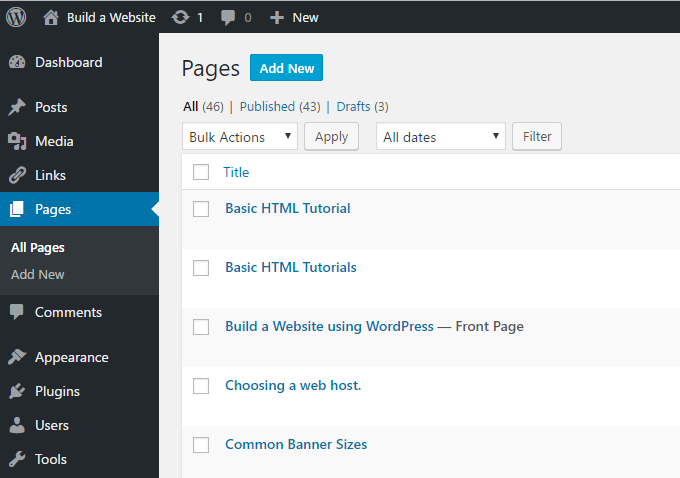
Creating content in WordPress in either a page or a blog post is very easy. Here’s a screenshot of the control panel to bring up a list of articles that I’ve written.
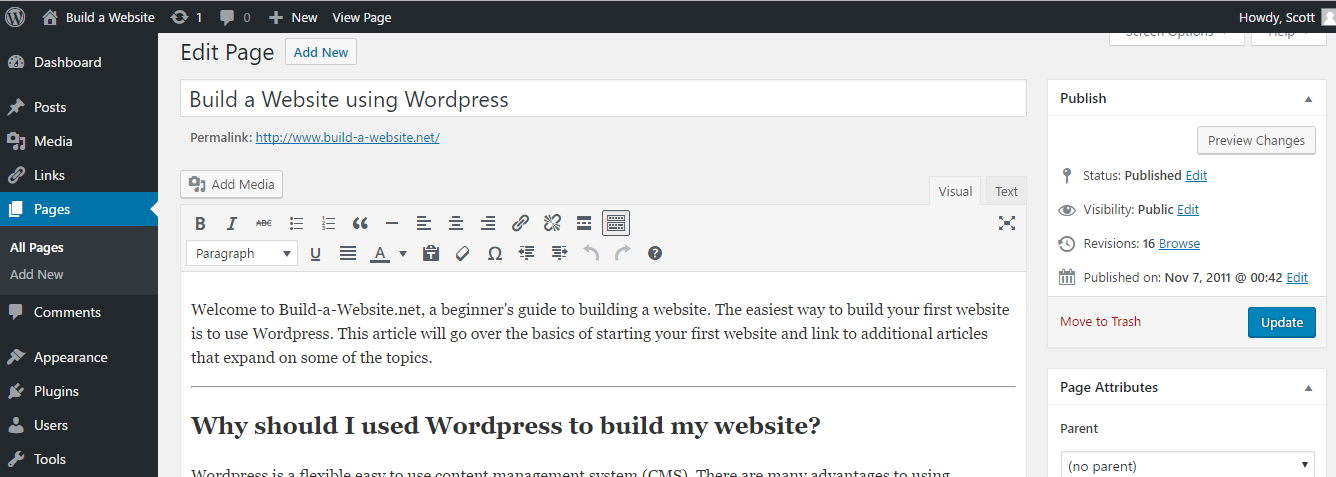
Editing and creating an article is just like writing an email or in Microsoft Word!
Outline to Building a Website:
The website is broken into 4 simple categories: plan, create, host, and promote. Currently I’m rebuilding the content to be structured mostly around build a WordPress powered website.
- Planning your website : The first steps to building your website are to figure out what it about, how it’s going to work, and how you want it to look.
- Creating your website : A brief overview on finding a web host, coding and a list of supplies.
- Text Coding or WYSIWYG : The Pro’s and Con’s of Text Coding and WYSIWYG editors.
- Text Code Editors : I recommend using Notepad++ to edit HTML and CSS files.
- Learning HTML : This is practically a required step to becoming a webmaster of any worth. Even if you plan on using Dreamweaver or Frontpage, you should still learn some HTML.
- Build a Website’s HTML Tutorial : My very own HTML tutorial. It covers most of the basic commands as well as frames and tables.
- Finding a Web host : A guide to finding a web host.
- Free or Paid : An article outlining a few of the differences between free and paid web hosting.
- Finding a Free Host : Explains how to choose an acceptable free host.
- Finding a Paid Host : An article on how to choose a good host; includes links to helpful resources.
- Vitural, Dedicated or Reseller : A simple guide explaining the differences between those kinds of web hosting accounts.
- Features : Explains what many of the features that your web host offers accually do.
- Domain Names : Explains how to register a domain name.
- Short URLS : Features information about Short URLs and free domains as well as a glossary of useful terms regarding the subject.
- Short URLS/Free Domain names : Includes a guide to learning how to use short URLs, and information about Short URLs.
- URL Snippers : A short article on what URL snippers do, and how to use them best.
- Uploading your website : A guide with introductions to uploading files via your browser and via FTP to the internet.
- FTP Clients : Short reviews of various FTP clients.
- How to FTP : A guide to using a FTP client (program) to upload a website to the internet. I used SmartFTP in this tutorial.
- Getting Visitors : Information about getting people to go to your website.
- Search Engines : Information about the major and minor seach engines.
- Major Directories : Brief descriptions of the major web directories.
- Basic SEO : Just some basic information about search engine optimization (SEO)
- Submitting to Directories : A guide to efficently submitting to directories.
- Forums : Forums and websites to learn about SEO.
- Free or Paid : An article outlining a few of the differences between free and paid web hosting.
- Making Money
- Publishing Banner Ads : Information about putting banner advertisements on your website to make money.
- Income Percentile : Check your income percentile.
- Google Adsense: An informational article about Google Adsense.